Fixing Design Debt in a Live HR Platform
Design triage, system unification, and feature redesign across a product already in production
Overview
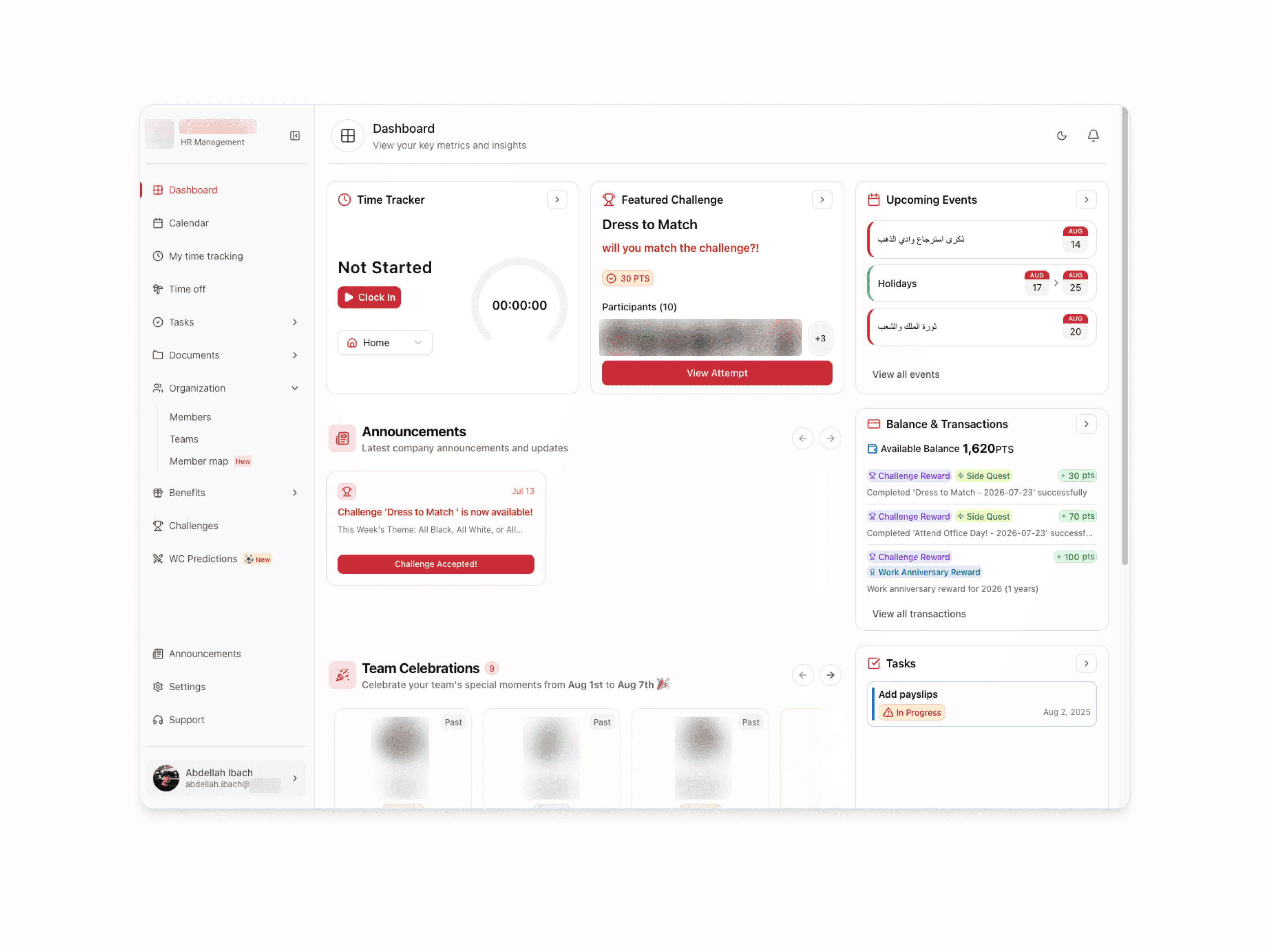
IMS (Internal Management System) is iMedia24's internal HR platform used by all ~100 employees across the company. It serves as the central interface between HR and staff, handling time tracking, time off requests, benefits claims, challenges and rewards, task management, team organization, and the company calendar.
When I joined iMedia in August, the application was already in active development. A previous designer had laid the groundwork before moving to another product, leaving the engineering team to build independently for roughly two to three months without design oversight.
The result was a product that worked functionally, but had accumulated significant inconsistency: components used out of context, navigation patterns that varied page to page, and visual decisions improvised under time pressure. My role was to diagnose what had drifted, establish a unified system, and redesign the highest-priority workflows, all while the product remained live and in daily use by employees.
- My role
- Senior Product Designer
- Timeline
- August 2025 – October 2025
- What I did
- Visual audit and design triage across eight features
- Component system unification and design governance
- End-to-end redesign of organization, profile, benefits, challenges, time off, and tasks
- Engineering collaboration and documented handoff
Measurable Outcomes
IMS serves 100 employees across iMedia24, and the redesign touched every major feature in the product (navigation, organization, profile, benefits, challenges, time off, and tasks) while the application remained live throughout.
The most significant outcome was not a single screen but a process shift: the engineering team moved from building without a design reference to working from a unified component system with clear handoff documentation.
Design decisions that had previously been improvised are now anchored to a defined system, reducing inconsistency as the product continues to evolve.
For users, the redesign resolved the most common friction points: employees can now navigate the app with a consistent orientation regardless of which section they're in, understand their benefits and challenge progress at a glance, and manage time off and task requests through flows that surface the right information at the right moment.
The product shipped to production incrementally, each feature redesign was validated in the live environment with real users, and the system established during this project continues to serve as the design foundation for ongoing IMS development.
8 +
Features Redesigned
100 +
Employees Impacted
1 .
Unified Component System
Establishing the Visual System
Before touching any individual feature, I needed to understand the full extent of the inconsistency.
I audited every page against the original design foundations and mapped the gaps: button variants applied inconsistently, icon sets mixed across pages, spacing values that didn't follow any defined scale, and page headers that looked different across nearly every section of the app.
My first decision was to unify the component foundations before redesigning any flows. Trying to fix individual pages without a shared system would mean patching symptoms rather than the root cause, and any future development would continue to drift.
I rebuilt the core component set: buttons, form inputs, navigation elements, and page headers. These became the baseline that every subsequent redesign was anchored to. The sidebar navigation and page header pattern were standardized across all eight sections of the app, giving users a consistent orientation point regardless of which feature they were in.
This systems-first approach also changed the working relationship with the engineering team. Developers who had been making visual decisions independently now had a clear, documented reference. It reduced ambiguity at handoff and meant I could move faster on individual features without re-explaining component behaviour each time.
Organization & Profile
The Organization page is one of the most frequently used areas of IMS — it's where employees browse their colleagues, find contact information, and understand the structure of the company. The Profile page is where each employee sees and manages their own information.
When I reviewed both pages, the core problem was information hierarchy:
Employee data was presented without a clear visual logic, making it hard to scan for what you needed. Profile editing was functional but lacked the feedback and structure that makes self-service forms feel trustworthy, especially when saving changes to personal records.
I redesigned both pages around a consistent information architecture:
Each employee record surfaces the same data fields in the same order, making the directory scannable rather than something you read line by line.
The Profile page was restructured to group related fields, clarify which information is editable, and provide clear confirmation when changes are saved.
Because this was the highest-priority redesign, HR relies on it daily, and employees update their information through it, I shipped it first and iterated based on real usage before moving to the next feature.
Benefits & Challenges
Benefits and Challenges are the most interconnected features in IMS. Employees earn points by completing challenges set by HR, and those points can be redeemed through the Benefits page.
The two features form a closed loop, a lightweight engagement and rewards system embedded inside an otherwise utility-focused tool.
The original implementation treated them as separate, unrelated pages. There was no visual language connecting them, no clear communication of how points flow from challenges into benefits, and the challenges themselves lacked the structure needed to communicate progress and completion clearly.
My redesign approached them as a system rather than two standalone features.
The challenges page was rebuilt to make the completion state, point value, and reward pathway legible at a glance. The benefits page was restructured so that employees could clearly see what they're eligible for and how to make a claim.
The redesign also required close coordination with the PM to ensure the point redemption logic was reflected accurately in the UI, an example of where design decisions directly shaped how the underlying feature was understood and documented.
Time Off & Task Management
Time Off and Tasks represent the most operationally sensitive workflows in IMS.
Time off requests have a direct business impact, incorrect submissions or unclear status states cause back-and-forth between employees and HR that slows down approvals.
The Tasks feature is how employees formally request things from HR and track their resolution, so ambiguity in status or ownership creates accountability gaps.
Both pages had been built with basic functionality intact, but without attention to the states that matter most: pending, approved, rejected, in progress, completed.
In the original designs, these states were either visually identical or communicated only through label text, easy to miss when scanning a list.
I redesigned both pages with status as the primary visual organizer. Each request type now has a distinct and scannable state treatment, making it immediately clear what requires action and what is already resolved. The time off request flow was restructured to reduce the number of decisions required per submission and to surface approval status without requiring the employee to dig for it.
Contact
Get in touch
I usually reply within 24 hours. Tell me what your team is working on.